What Defines High-Quality LED Display Performance?
When comparing LED displays, most buyers immediately ask about pixel pitch or price per square meter. However, experienced system integrators know that pixel pitch alone does not determine image quality. Two LED displays with the same resolution can produce dramatically different visual results because of differences in viewing angle, brightness, grayscale processing, refresh technology, and driving methods.
Whether you’re selecting an LED display for luxury retail, shopping malls, museums, corporate showrooms, airports, exhibitions, or digital signage, understanding these specifications helps you avoid investing in a screen that looks impressive on paper but disappointing in real-world applications.
This guide explains the key factors that truly define premium LED display performance.
1. LED Viewing Angle: How Wide Can Your Audience See the Screen?
What Is Viewing Angle? The LED viewing angle refers to the maximum angle from which viewers can still see clear images with acceptable brightness and color.
It consists of two measurements:
- Horizontal Viewing Angle – visibility from left to right
- Vertical Viewing Angle – visibility from above and below

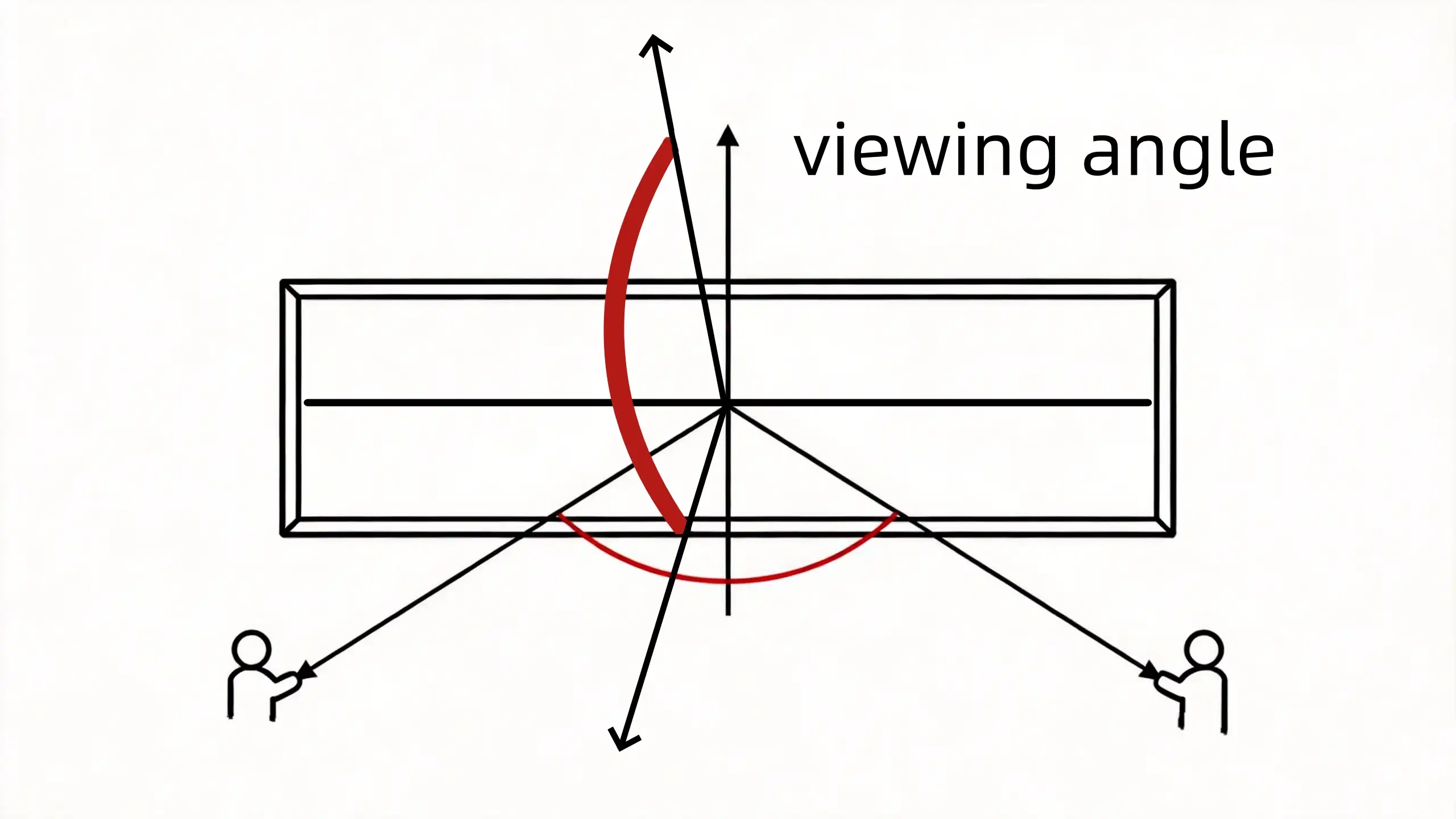
These specifications determine how many people can comfortably view the display without experiencing image degradation. For retail environments, museums, transportation hubs, and exhibition halls, viewing angle directly affects audience engagement.
Imagine installing a transparent LED display inside a luxury storefront. Customers walking directly in front of the glass enjoy a bright, vibrant image. But customers approaching from the side may see: reduced brightness, washed-out colors, lower contrast, and gray-looking images.
A narrow viewing angle means only a small percentage of pedestrians experience the display as intended. A wide viewing angle ensures your content remains attractive from multiple directions.
What Determines Viewing Angle?
The viewing angle is fundamentally determined by the light-emitting characteristics of the LED package. As viewers move away from the center of the LED, brightness gradually decreases.
The LED industry defines the standard viewing angle as the angle where brightness falls to 50% of the brightness measured directly in front of the display.
LED displays typically offer:
- Horizontal: 140°–160°
- Vertical: 120°–140°
Higher-quality displays maintain color consistency across these wider angles.
2. LED Brightness: Why Nits Matter More Than You Think
What Is LED Brightness?
Brightness measures the amount of light emitted by an LED display. It is measured in: cd/m² (candela per square meter), also commonly called nits. Brightness determines how well a display remains visible under ambient lighting.
Transparent LED displays face unique challenges because sunlight passes directly through glass. To maintain vivid images without blocking natural light, high brightness is essential.
3. LED Gray Scale: The Hidden Secret Behind Premium Image Quality
Many buyers compare brightness. Few compare gray scale. Yet gray scale often determines whether an LED display looks premium or inexpensive.
What Is Gray Scale?
Gray scale describes how many brightness levels each RGB color channel can reproduce between completely off and fully illuminated. It is measured in bits. Higher bit depth means more brightness levels and smoother color transitions.
Typical Gray Scale Levels
Why Gray Scale Matters
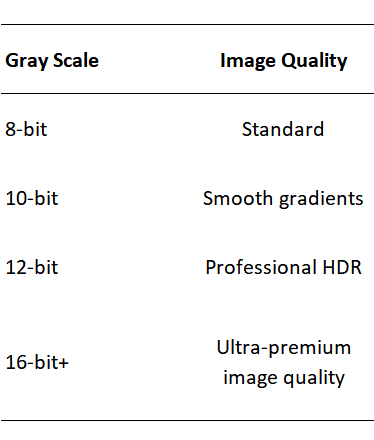
Imagine displaying a sunset. Without sufficient gray scale:
- The orange sky becomes color bands.
- Shadows lose detail.
- Smooth gradients turn into visible blocks.
- Fine textures disappear.
Even displays with high brightness can appear cheap if their gray scale performance is insufficient.
4. Brightness and Gray Scale: Why Both Matter Together
Brightness and gray scale are closely related. Think of them as two complementary aspects of image quality. Brightness defines how much light the display can produce. Gray scale defines how precisely that light is controlled.
Without sufficient gray scale:
- Bright areas become overexposed.
- Dark areas lose detail.
- Images appear flat.
Without sufficient brightness: Fine image detail may still exist but becomes difficult to see under strong ambient lighting.
Only when both are optimized can an LED display produce images with:
- Bright highlights
- Rich shadow detail
- Smooth gradients
- High dynamic range
- Realistic colors
This balance is especially important in commercial environments where lighting conditions change throughout the day.
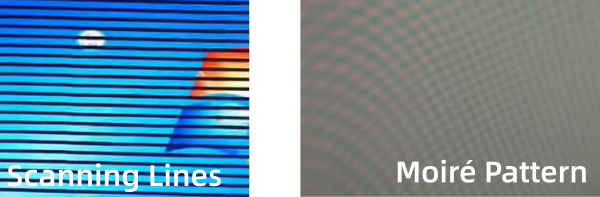
5. Moiré Pattern: Why Strange Ripples Appear on Camera
Many customers notice strange wave-like patterns when photographing LED displays. This phenomenon is called the Moiré pattern.
What Is a Moiré Pattern?
A moiré pattern occurs when two repeating pixel structures interfere with each other.
Typically these are:
- the LED pixel matrix
- the camera sensor pixel array
The interference creates:
- Ripple-like waves
- Curved lines
- Irregular mesh patterns
- Important Characteristics
Unlike scanning lines, moiré patterns:
- are not related to refresh rate
- can appear even when the screen is turned off
- depend on camera angle, lens focal length, distance, and sensor resolution
How to Reduce Moiré
While it cannot always be eliminated completely, moiré can often be minimized by:
- Slightly changing the shooting angle
- Increasing the camera distance
- Avoiding extreme close-up shots
- Recording at 24 fps when appropriate
- Using cameras with anti-moiré or optical low-pass filters
- Adding a soft diffusion filter to reduce optical interference

6. Scanning Lines: A Different Problem Entirely
Scanning lines are often confused with moiré patterns. They are actually a completely different phenomenon.
What Are Scanning Lines?
Scanning lines are horizontal dark bands that appear because the camera captures different portions of the LED screen while it is refreshing. This happens when LED refresh frequency and camera shutter speed are not synchronized.
What Causes Scanning Lines?
Displays using lower refresh frequencies or scanning drive methods may show obvious dark bands during photography or video recording.
Unlike moiré patterns:
- Scanning lines only appear while the display is operating.
- They disappear when the screen is turned off.
- They are directly related to refresh technology.
Static Drive vs. Scanning Drive
Professional commercial displays increasingly adopt static driving technology.
Advantages include:
- No visible scanning lines
- More stable brightness
- Better image consistency
- Superior broadcast and live-event recording
This is particularly valuable for retail displays that are frequently photographed and shared on social media.
Why InVisia Transparent LED Screens Deliver Superior Image Quality
Image quality is the result of the entire display system—not just pixel pitch. At InVisia, our holographic transparent LED displays are engineered to deliver premium visual performance through a combination of advanced optical, electrical, and structural design.
Key features include:
- 160° horizontal / 140° vertical viewing angles for consistent visibility across wide audiences.
- 3,500 nits brightness with black LEDs, providing excellent readability and high contrast in bright commercial spaces.
- ≥16-bit gray scale for smooth gradients, accurate colors, and exceptional shadow detail.
- Static driving architecture, eliminating scanning lines during photography and video recording.
- Integrated LED and driver design, improving signal stability while avoiding the scanning artifacts commonly associated with conventional scanning systems.
- Four-layer PCB with 2 oz copper, enabling better heat dissipation, long-term reliability, and stable high-brightness operation.
These technologies work together to create vivid, camera-friendly visuals that enhance customer experiences in retail storefronts, shopping malls, museums, airports, corporate showrooms, and other high-end commercial environments.
Choosing an LED Display: Look Beyond Pixel Pitch
When evaluating LED displays, don’t focus solely on resolution or price. Ask your supplier these questions:
- What are the horizontal and vertical viewing angles?
- Is the brightness appropriate for my installation environment?
- What gray scale level does the display support?
- Does the display use static or scanning drive technology?
- Will it produce moiré patterns or scanning lines during photography?
- How stable is the display under long-term high-brightness operation?
The answers reveal far more about real-world image quality than pixel pitch alone. For businesses investing in premium digital signage, selecting a display with balanced brightness, wide viewing angles, high gray scale, and advanced driving technology ensures a better visual experience, stronger brand presentation, and a longer-lasting return on investment.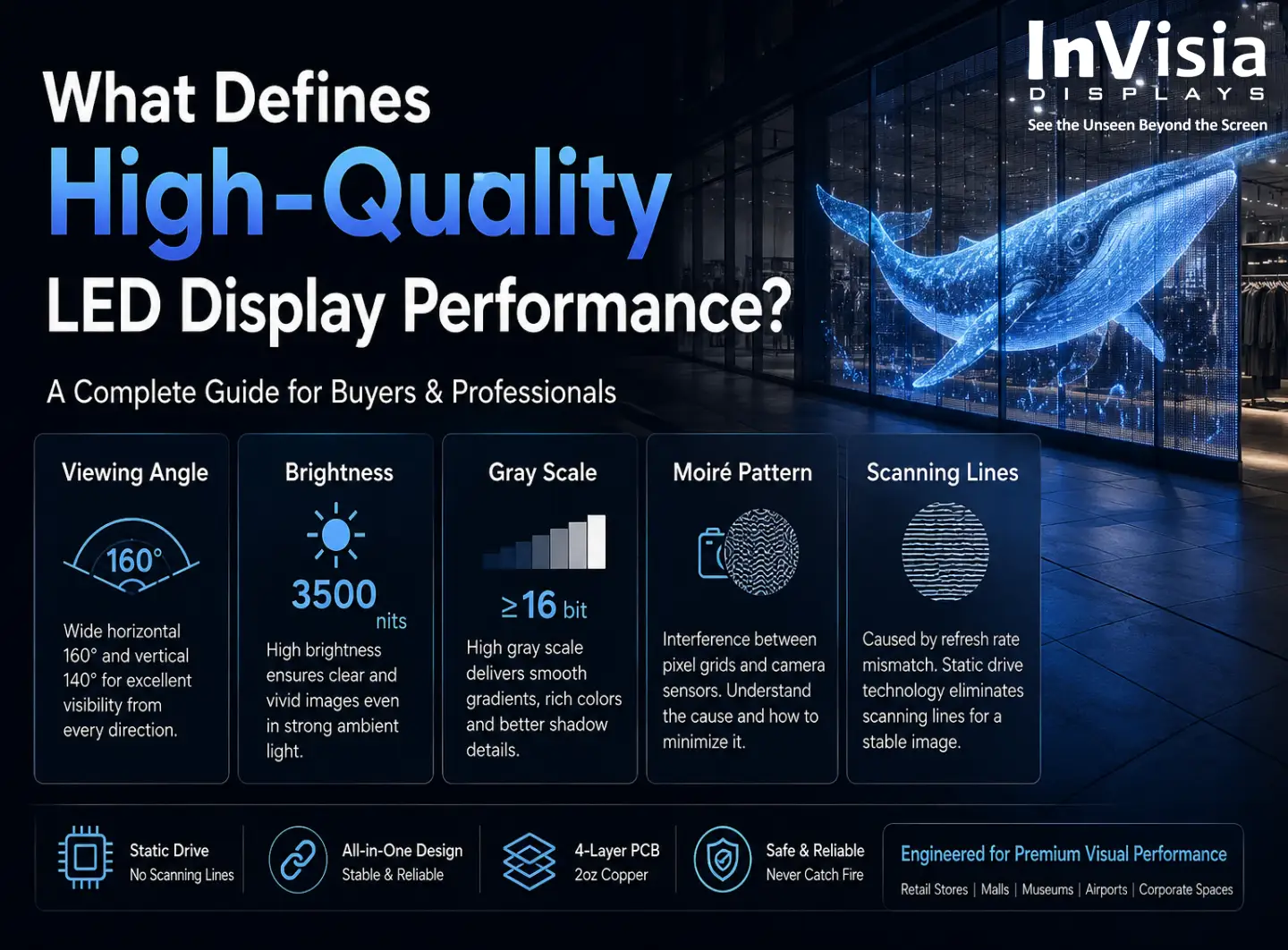

 5th Floor, Building 9, Hengchangrong High-Tech Industrial Park, Bao'an District, Shenzhen 518128, China